


 Ajouter comme source préférée sur Google
✅ Article remis à jour le 8 June 2026, pour que tu aies toujours les infos pertinentes !
Have you ever wanted to throw your phone across the room because of a useless travel app?
Same.
In Thailand, the app jungle can quickly become a proper headache.
So I did the homework for you: I tested almost everything and picked the apps that are actually worth downloading.
The ones that make your life easier and stop your trip from turning into a digital episode of Survivor.
🛏️ Where to Stay in Thailand: The Best Accommodation Apps
A bad night’s sleep can ruin an entire trip.
These 3 apps cover pretty much every type of traveler, from backpackers to holidaymakers who just want a decent hotel without selling a kidney.
Trip
Trip.com has become my go-to app for booking hotels and flights since I started living in Thailand.
The choice is huge, the prices are often lower than on competing platforms and the interface is genuinely pleasant to use.
During a stay in Phuket, I had an issue with my booking.
Customer support replied in under an hour.
That’s rare enough to deserve a mention.
✅ Best for: competitive prices, a huge selection of hotels, hostels and apartments, an intuitive app and responsive 24/7 customer support.
⚠️ The downside: it’s less well-known in Europe than Agoda or Booking, but that doesn’t make the service any less solid.
👤 Who should use it: pretty much everyone, especially if you want to book your hotel and flight in one place.

👉 Trip official website – Trip for iPhone – Trip for Android
Agoda
Agoda is still a very safe bet, especially if you’re looking for unusual stays or small guesthouses that don’t always show up on bigger platforms.
It’s also particularly strong across Southeast Asia.
✅ Best for: a very wide selection in Asia, efficient filters and good rates negotiated directly with Thai hotels.
⚠️ The downside: the interface feels a bit busier than Trip.com and prices can be more or less interesting depending on the day.
👤 Who should use it: travelers who like comparing options and finding places a little off the beaten path.

👉 Agoda official website – Agoda for iPhone – Agoda for Android
Hostelworld
If you’re traveling on a tight budget or you mainly want to meet people, Hostelworld is the go-to app for hostels.
The reviews are detailed and the community is active. You can even filter by vibe: party, quiet, social, family-friendly and more.
✅ Best for: hostel specialists, detailed reviews and dorm beds that can start from just a few euros per night.
⚠️ The downside: it’s focused on hostels, so it’s not ideal if you want a hotel or apartment.
👤 Who should use it: backpackers, solo travelers and anyone watching their budget.

👉 Hostelworld official website – Hostelworld for iPhone – Hostelworld for Android
🚖 Getting Around Thailand: Taxi and Ride-Hailing Apps
Taxis with no meter, tuk-tuks that magically “forget” to agree on the price first… most travelers experience it at least once.
These apps solve that problem: fixed price upfront, tracked route and identified driver.
Grab
Grab is the Asian equivalent of Uber, but with even more features.
In one app, you can order a taxi, a motorbike taxi, a private car or even food delivery.
It’s the reference app in Thailand and it works in all major cities across the country.
You can pay in cash or by card.
The price is shown before you confirm the ride, so there are no nasty surprises when you arrive.
✅ Best for: wide availability in Thailand, fixed price before the ride, several options including taxi, motorbike and private car, card payments accepted.
⚠️ The downside: it can be slightly more expensive than Bolt on longer rides.
👤 Who should use it: all travelers, especially first-timers in Thailand.

👉 Grab for iPhone – Grab for Android
Bolt
Bolt works in a similar way to Grab, but with prices that are often more attractive, especially for medium to long rides.
It’s the app I open alongside Grab when I want to compare prices before booking.
✅ Best for: prices that are usually lower than Grab, a simple interface and availability in Bangkok and the main tourist cities.
⚠️ The downside: there are fewer drivers than on Grab in some areas or at quiet times and coverage is more limited outside major hubs.
👤 Who should use it: travelers who want to keep transport costs under control.

👉 Bolt for iPhone – Bolt for Android
inDrive
inDrive works differently: you suggest your price and choose your driver.
You can see the vehicle, driver reviews and negotiate the fare before confirming.
It’s ideal for longer journeys, for example a Bangkok to Pattaya ride.
✅ Best for: negotiable prices, full transparency on the driver and vehicle and very competitive rates for longer distances.
⚠️ The downside: acceptance can take longer because the driver has to approve your offer. It’s less convenient for short, quick rides.
👤 Who should use it: travelers doing intercity trips or anyone who wants more control over the price.

👉 inDrive for iPhone – inDrive for Android
MuvMi
MuvMi is the tuk-tuk reinvented.
It’s an on-demand shared electric transport service designed for short everyday rides in Bangkok.
It covers areas where the BTS and MRT don’t reach.
Imagine the child of Uber and a traditional tuk-tuk: the efficiency of the first, the charm of the second and fewer tourist-trap surprises in between.
No bargaining, no smoke, just the ride.
✅ Best for: low fixed prices, quiet electric vehicles, a fun local experience and last-mile trips after the metro.
⚠️ The downside: it’s only available in selected areas of Bangkok and nearby zones. It hasn’t expanded to other Thai cities yet.
👤 Who should use it: residents and travelers in Bangkok who want to avoid traditional tuk-tuks without booking a Grab.

👉 MuvMi for iPhone – MuvMi for Android
🚊 The Best Apps for Public Transport
Buses, skytrain, MRT, ferries… Bangkok’s transport network is dense and can quickly become a maze without the right tools.
Here’s what I use in everyday life.
12GO
12GO is my favorite app for traveling between cities in Thailand.
Trains, buses, ferries, minivans: you can book everything in just a few clicks. Tickets are sent by email or stored directly in the app.
✅ Best for: covering all intercity transport options, digital tickets and ferry bookings to the islands.
⚠️ The downside: it’s not designed for everyday urban transport like local buses, BTS or MRT. Prices also include a small booking fee.
👤 Who should use it: travelers heading from Bangkok to Chiang Mai, Krabi, Koh Samui or pretty much anywhere else in Thailand.

👉 12GO official website – 12GO for iPhone – 12GO for Android
Google Maps
Essential in Thailand. Honestly, essential almost everywhere.
Google Maps works very well in Bangkok: BTS, MRT, buses, schedules… it’s all there.
The multimodal route search is reliable and walking directions are accurate, even through small side streets.
✅ Best for: free navigation, accurate directions, multimodal routes and offline use once maps are downloaded.
⚠️ The downside: local bus times are not always updated in real time. Use Viabus as a backup for that.
👤 Who should use it: everyone. No exception.

👉 Google Maps for iPhone – Google Maps for Android
Viabus
Viabus is the perfect companion to Google Maps for buses in Bangkok.
Where Google Maps gives you the route, Viabus shows you in real time where your bus actually is on the map.
No more standing at the stop wondering whether the bus has already passed or is just living its best Bangkok traffic life.
✅ Best for: real-time GPS tracking for buses in Bangkok, bus stop visibility on the map and free access.
⚠️ The downside: it’s mainly useful in Bangkok and coverage is more limited in other Thai cities.
👤 Who should use it: anyone using Bangkok buses regularly and trying to avoid pointless waiting.

👉 Viabus for iPhone – Viabus for Android
THE SKYTRAINs
This is the official app for navigating the BTS Skytrain lines in Bangkok.
It gives you a clear view of the network, connections and fares based on your departure and arrival stations.
✅ Best for: an interactive BTS map, real-time fare calculation and connection information with the MRT.
⚠️ The downside: it doesn’t cover the MRT underground metro or other transport lines.
👤 Who should use it: travelers staying in Bangkok and using the BTS regularly.

👉 The SKYTRAINs for iPhone – The SKYTRAINs for Android
💸 Apps to Manage Money and Payments in Thailand
Thai ATMs usually charge a fixed withdrawal fee of around 220 to 350 baht per withdrawal, on top of whatever your own bank charges.
Over a one-week trip, that adds up quickly.
These 2 apps help reduce the damage and let you pay more like a local.
Revolut
Revolut has been my main banking app since I started living in Thailand.
Fee-free withdrawals up to a monthly limit, payments in local currency at a fair exchange rate and full account management from the app.
It’s simple and helps avoid bad surprises on your bank statement.
For more details, I’ve written a full guide on how to reduce banking fees in Thailand.
✅ Best for: real exchange rates, free withdrawals up to your monthly allowance, instant notifications after each payment and multi-currency accounts.
⚠️ The downside: withdrawals above your monthly limit are subject to a 2% fee.
👤 Who should use it: travelers who want to avoid unnecessary banking fees in Thailand.

👉 Revolut for iPhone – Revolut for Android
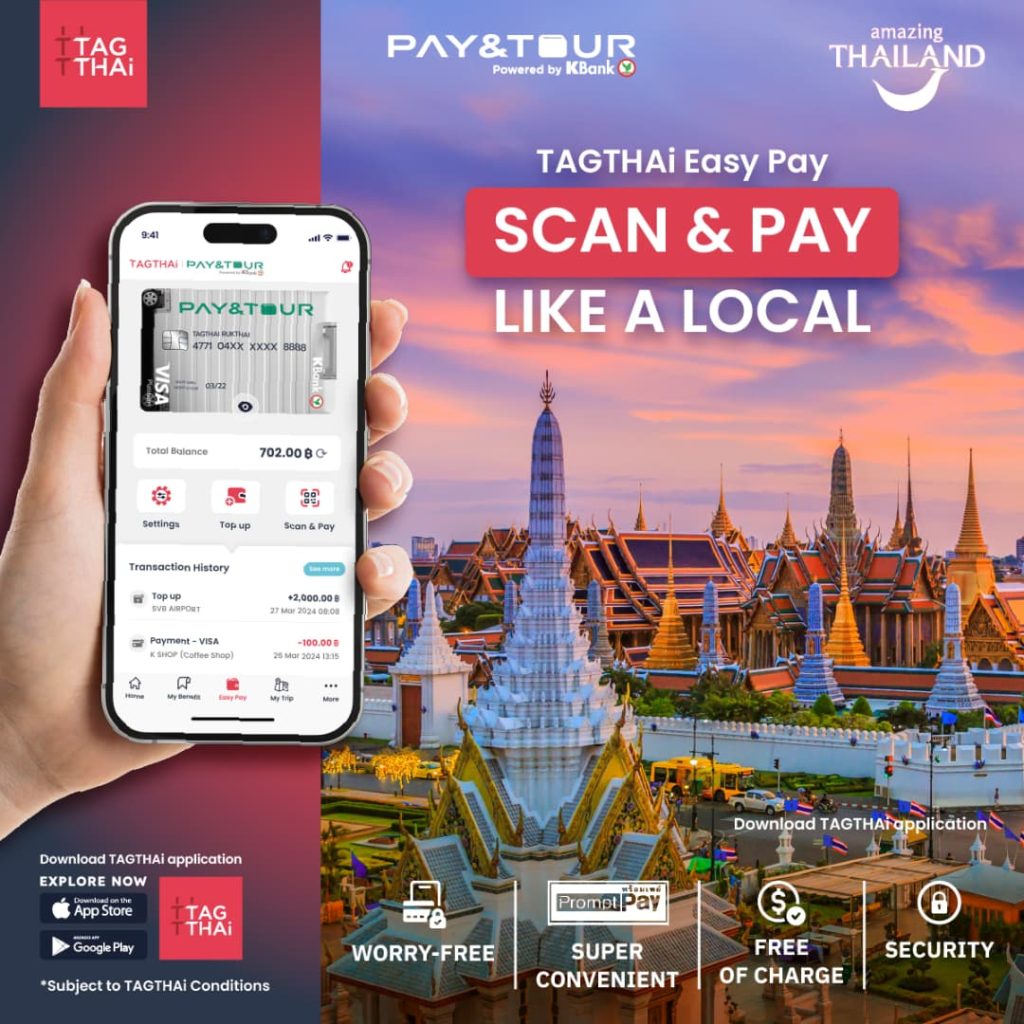
TAGTHAi Easy Pay
In Thailand, QR code payment is king.
Thai people use PromptPay, the national instant payment system, to pay for pad kra pao, massages, rent and pretty much everything in between.
Until recently, it was almost impossible for foreign visitors to use it.
But TAGTHAi Easy Pay changes that.
It’s an e-wallet designed especially for foreign visitors and developed with Kasikorn Bank (KBank).
You top up the app with your foreign bank card and pay by QR code like a local.
It works at street food stalls, markets, 7-Eleven, restaurants, massage shops, more and more taxis and even some temples.
I’ve written a dedicated article if you want all the details.
✅ Best for: access to the PromptPay QR payment system for foreigners, wide acceptance wherever QR payments are available and an English interface.
⚠️ The downside: the exchange rate is not always the most attractive, identity verification is required and top-up limits depend on your verification level.
👤 Who should use it: travelers staying several weeks or anyone who wants to blend into daily Thai life a little more.
👉 TAGTHAi Easy Pay for iPhone – TAGTHAi Easy Pay for Android
🔒 Protecting Your Privacy in Thailand
Public Wi-Fi in hotels, cafés and airports is convenient… and risky.
Without protection, your passwords, emails and banking data can be exposed on the network.
That’s a very good reason to install a VPN before you leave.
ExpressVPN
ExpressVPN is the one I’ve been using for several years.
It encrypts your connection, hides your IP address and helps you access geo-blocked content from Thailand.
For example, your usual streaming platforms, sports content or services that are only available back home.
✅ Best for: fast and stable connections, availability on all devices, access to geo-blocked content abroad and a simple interface.
⚠️ The downside: it’s a paid subscription, but that’s the price of online peace of mind.
👤 Who should use it: travelers and expats, especially if you often use public Wi-Fi or want to access your usual streaming services from Thailand.

👉 ExpressVPN for computer, iPhone and Android
🎟️ Booking Activities and Tours
Street vendors on Khaosan Road have a special talent for selling almost anything at almost any price.
These apps help you book activities with verified providers, real reviews and clear cancellation policies.
GetYourGuide / Klook
GetYourGuide and Klook cover pretty much everything you can imagine doing in Thailand: Thai cooking classes, diving in Koh Tao, Ayutthaya tours, boat trips in Krabi and more.
The catalog is huge and verified reviews help you separate the gems from the tourist traps before paying.
✅ Best for: a wide choice of activities across the country, verified reviews, free cancellation on many bookings and often competitive prices.
⚠️ The downside: very local or niche activities are not always listed. For those, it’s better to contact local providers directly.
👤 Who should use it: travelers who want to plan activities in advance with more security.

👉 GetYourGuide official website – GetYourGuide for iPhone – GetYourGuide for Android
🥘 Ordering Food in Thailand
Food delivery is extremely developed in Thailand.
In just a few minutes and for a few dozen baht, you can get pad Thai or som tam delivered straight to your hotel.
Since Foodpanda left Thailand in 2025, 2 main apps dominate the market, with a third one worth keeping as a backup.
GrabFood
GrabFood is built directly into the Grab app, the same one you’ll probably already use for taxis.
It offers the largest number of restaurants in Thailand, with very wide national coverage.
✅ Best for: a huge catalog, availability in most major cities and fast delivery in Bangkok.
⚠️ The downside: it can be slightly more expensive than LINE MAN or ShopeeFood on some orders and the interface is only partly translated into English.
👤 Who should use it: everyone, especially if you already have Grab installed for your rides.

👉 Grab for iPhone – Grab for Android
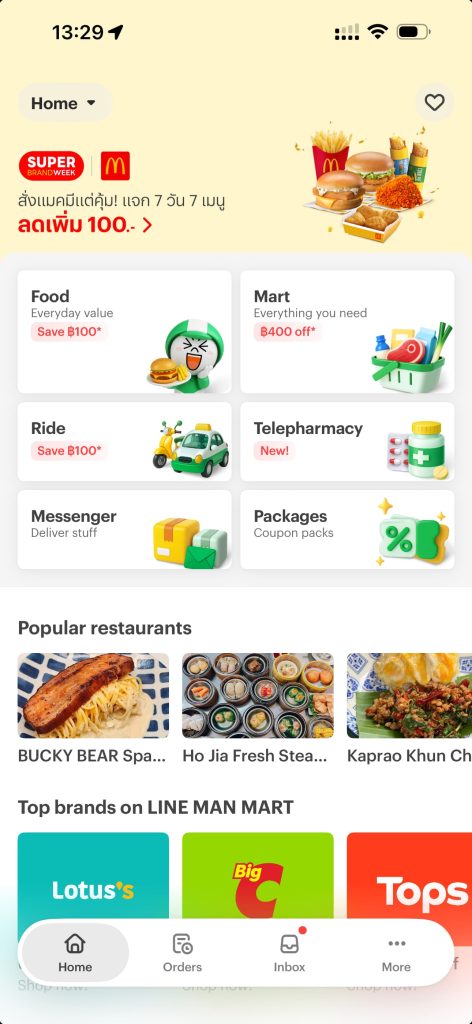
LINE MAN
LINE MAN is the local alternative to GrabFood and it’s very popular with Thai people themselves.
Since Foodpanda left the market, it has gained a large share of food delivery in Thailand.
Prices are often slightly lower and the selection of local restaurants is excellent.
✅ Best for: excellent coverage in Bangkok, competitive prices and plenty of local restaurants you won’t always find on GrabFood.
⚠️ The downside: menus are not always translated into English, which can make browsing a little less intuitive for foreigners.
👤 Who should use it: travelers staying several weeks who want to explore real local food, or anyone hunting for slightly better prices.
ShopeeFood
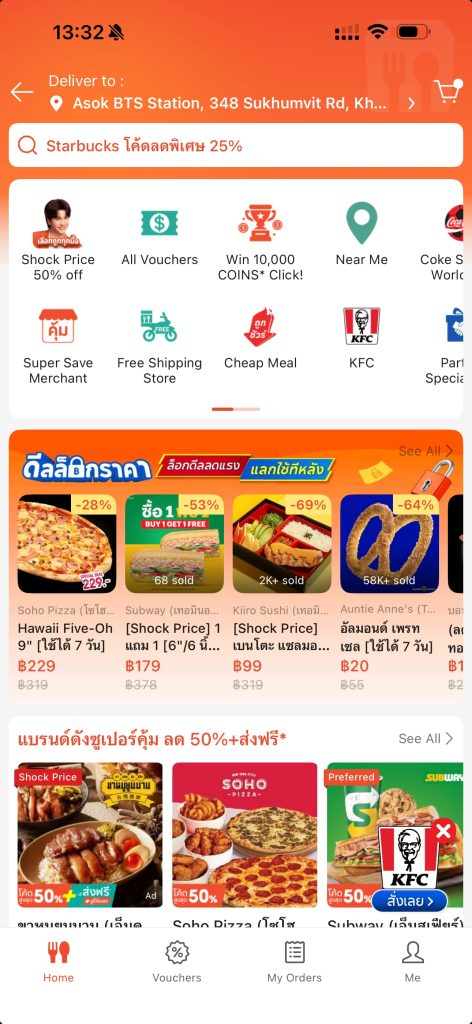
ShopeeFood is the third serious option in Thailand’s food delivery market.
It’s powered by the Shopee ecosystem, which is hugely popular in Southeast Asia, and it regularly offers aggressive discounts, especially for new users.
✅ Best for: frequent promotions, discounts for new accounts, a decent catalog in Bangkok and an English interface.
⚠️ The downside: coverage is more limited than GrabFood outside Bangkok and major tourist cities and there may be fewer drivers during quiet hours.
👤 Who should use it: anyone who wants a third option when GrabFood and LINE MAN are more expensive.
👉 ShopeeFood for iPhone – ShopeeFood for Android
🛒 Grocery Shopping
If you’re staying several weeks and have access to a kitchen, grocery delivery can genuinely change your life.
No need to go outside in 38°C heat just to buy rice or milk.
Big C PLUS
Big C is one of the most common supermarket chains in Thailand.
Its app lets you order online and get groceries delivered directly to your place in most major cities.
✅ Best for: a wide range of food and household products, fast delivery in major cities and supermarket prices without crazy delivery markups.
⚠️ The downside: delivery availability depends on your location.
👤 Who should use it: expats and long-stay travelers with access to a kitchen.

👉 Big C PLUS for iPhone – Big C PLUS for Android
🈳 Translation and Communication
Thai uses its own alphabet, completely different from the Latin alphabet.
A menu, a sign, a receipt… anything can suddenly turn into a riddle.
These 2 apps help you get out of that situation quickly.
Google Translate
Google Translate does a decent job with Thai.
The real game-changing feature is live camera translation: point your phone at Thai text and the translation appears directly on the screen.
Perfect for reading a menu or sign without typing anything.
✅ Best for: real-time camera translation, voice translation, offline use with downloaded language packs and free access.
⚠️ The downside: Thai translations are not always perfect, especially with idioms or menu abbreviations.
👤 Who should use it: everyone. This is a must-have from day 1.

👉 Google Translate for iPhone – Google Translate for Android
LINE
LINE is basically the “Thai WhatsApp”.
Except here, everyone actually uses it.
Hotels, guides, apartment owners, scooter rental shops: if you want to communicate with people in Thailand, you need LINE.
WhatsApp technically works, but your contact may not use it, especially outside tourist areas.
✅ Best for: being used by almost everyone in Thailand, free calls, stickers and an English interface.
⚠️ The downside: you need a phone number to sign up and the interface feels a little different from WhatsApp at first.
👤 Who should use it: all travelers. It’s the number 1 messaging app in Thailand.

👉 LINE for iPhone – LINE for Android
💱 Currency Conversion
1 euro is usually around 37–38 baht, depending on the day’s exchange rate.
But some exchange booths display their own “great rates”, which are often great mostly for them.
Always check before exchanging cash.
XE Converter
XE Currency is one of the global references for real-time exchange rates.
Enter an amount and instantly see its value in baht or any other currency.
It’s the app you’ll open at the exchange booth to make sure you’re not being taken for a ride.
✅ Best for: real-time exchange rates, offline use with the last synced rate, simultaneous multi-currency conversion and free access.
⚠️ The downside: it shows the reference interbank rate, which is always slightly better than what you’ll get in real life, but it’s still the best comparison base.
👤 Who should use it: travelers exchanging cash at local currency exchange booths.

👉 XE Converter for iPhone – XE Converter for Android
🌬️ Checking Air Quality
Between January and April, northern Thailand, especially Chiang Mai, can show some of the worst pollution levels in the world because of agricultural burning.
Even Bangkok regularly suffers from fine particle pollution peaks.
This app tells you when to wear a mask and when to cancel your outdoor plans.
AirVisual
AirVisual gives you the real-time Air Quality Index (AQI) for your location, with forecasts for the next few hours.
You can also set automatic alerts when pollution goes above a level you choose.
✅ Best for: real-time data, customizable alerts, pollution maps by area and clear recommendations such as avoiding outdoor activities or wearing a mask.
⚠️ The downside: coverage may be less precise in small towns or rural areas far from monitoring stations.
👤 Who should use it: essential if you’re going to Chiang Mai or Bangkok between January and April and useful everywhere else for checking occasional pollution peaks.

👉 IQAir AirVisual for iPhone – IQAir AirVisual for Android
What are the must-have apps for Thailand?
The 6 apps you should download before landing are Grab for taxis, Google Maps for navigation, LINE and Google Translate for communication, 12GO for intercity transport and Revolut for managing money.
Everything else depends on your travel style.
Does Google Maps work well in Thailand?
Yes, very well, including for public transport in Bangkok.
Download offline maps before your trip so you’re never stuck without internet.
What is the Uber equivalent in Thailand?
Grab is the Uber equivalent in Thailand.
It’s available across the country, accepts card or cash payments and shows the price before you confirm the ride.
Can you pay without cash in Thailand?
More and more, yes.
Bank cards are accepted in hotels and larger shops.
To pay like a local in markets, street food stalls and small restaurants, use TAGTHAi Easy Pay.
It gives foreign visitors access to Thailand’s PromptPay QR code system.
Which app should I use to book trains or buses in Thailand?
12GO is the reference app for booking train, bus, ferry and minivan tickets in Thailand.
Tickets are sent directly by email and can also be stored in the app.
Does WhatsApp work in Thailand?
Yes, WhatsApp technically works in Thailand, but many locals don’t use it.
To communicate with hotels, guides, drivers or local contacts, you’ll need LINE.
It’s the number 1 messaging app in Thailand.
Do you need a VPN in Thailand?
It’s not mandatory, but it’s strongly recommended.
A VPN protects your data on public Wi-Fi and helps you access your usual streaming platforms or online services from Thailand.







What do you think?
It is nice to know your opinion. Leave a comment.